
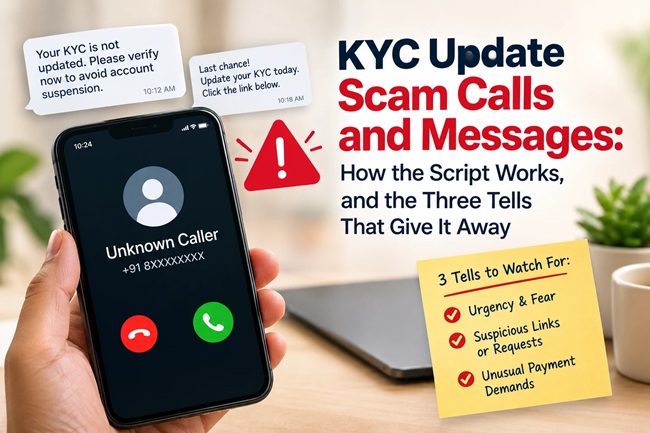
KYC Update Scam Calls and Messages: How the Script Works, and the Three Tells That Give It Away

By the FinanceChecks.com Editorial Team | Published October 6, 2026 | Last reviewed October 6, 2026 | 8-minute read
If you bank in India, there’s a good chance you’ve already received this message at least once. It says your KYC has expired, your account will be blocked within hours, and you need to act immediately by clicking a link or calling a number. The bank name changes, SBI this week, HDFC the next, ICICI after that, but the underlying script barely changes at all, because it doesn’t need to. It keeps working.
This guide breaks down how the KYC scam actually operates, what the message and call patterns genuinely look like, and the specific checks that let you tell a real bank communication from a fraudulent one in under thirty seconds.
Quick Answer
A KYC update scam is a phishing attempt where fraudsters impersonate your bank, UIDAI, or a telecom provider, claiming your KYC (Know Your Customer) details have expired or are incomplete, and that your account, UPI access, or SIM will be blocked unless you act immediately. The message or call pushes you toward clicking a link, calling an unfamiliar number, downloading an app, or sharing an OTP, card number, or PIN. The single most reliable fact to remember is this: no genuine bank, UIDAI process, or RBI procedure in India ever asks you to complete KYC by clicking a link in an SMS, over a phone call, or by installing an app sent through WhatsApp. Real KYC updates happen only at a branch, through your bank’s own verified app or website that you open yourself, or through a video-KYC session that you initiate. If you’ve received a message like this, don’t click anything, verify independently by calling the number on the back of your card, and report it to cybercrime.gov.in or call 1930 if you’ve already shared any details.
About This Guide
This guide was compiled by the FinanceChecks.com editorial team using RBI advisories on banking fraud, CERT-In guidance on phishing and smishing, and documented case patterns reported by Indian cybercrime authorities and financial institutions. Because scam scripts are designed to create urgency and panic, this guide focuses on the structural pattern behind these messages and calls, the elements that stay consistent regardless of which bank’s name is used, rather than reproducing a complete, ready-to-use script. Recognising the pattern is what protects you, not memorising specific wording that scammers change constantly anyway.
How the Scam Typically Unfolds
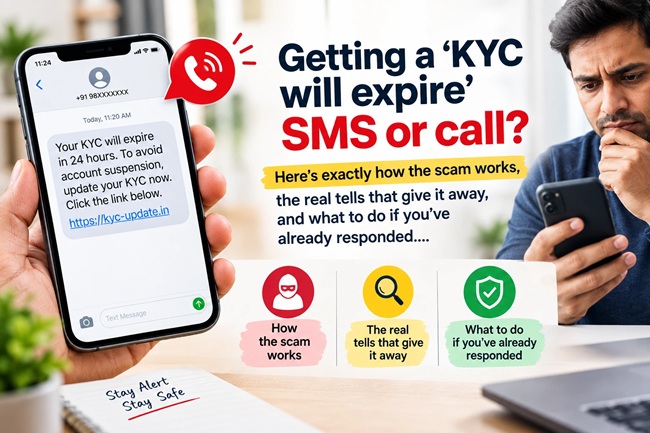
Step one: the bait arrives. This usually comes as an SMS, a WhatsApp message, or occasionally a phone call, claiming your KYC has expired or is incomplete, and that your account, UPI, or SIM access will be suspended, often within a specific, short window like 24 hours. The message is built to feel official, it uses a real bank’s name and logo, and sometimes arrives alongside or shortly after a genuine bank SMS, which lends it borrowed credibility.
Step two: urgency replaces verification. The message or caller creates pressure that discourages you from pausing to check. Phrases centred on immediate account suspension, permanent loss of access, or same-day deadlines are doing the same job regardless of exact wording, they’re designed to make you act before you think to verify.
Step three: you’re pushed toward one of a few traps. Depending on the variant, you might be asked to click a shortened or lookalike link that leads to a fake bank login page designed to steal your credentials, call a number provided in the message that connects you to a fraudster posing as bank staff, share an OTP or PIN over a call under the guise of “verification,” or install an app, sometimes sent as a file over WhatsApp, that’s actually malware requesting SMS access, accessibility permissions, or screen-overlay control, giving the scammer remote access to your device.
Step four: the actual theft. Once credentials, an OTP, or device access are obtained, money typically moves out of the account quickly, sometimes within minutes, which is exactly why acting on suspicion immediately matters more than almost anything else in this entire pattern.
What the Messages Generally Look Like
Rather than reproducing a full, ready-to-use script, which would do more to help a scammer refine their message than to help a reader spot one, it’s more useful to understand the handful of structural elements that appear across nearly every version of this scam.
The message typically names a specific, real bank. It states that KYC is expired, pending, or incomplete. It threatens a consequence, usually account suspension or blocking, within a tight, specific timeframe. It includes a call to action, a link, a phone number, or an instruction to reply or call, that requires you to act somewhere other than the bank’s own official app or website. And it often arrives from an unfamiliar or random mobile number rather than a bank’s registered SMS header or shortcode, though more sophisticated versions can spoof even that.
Fraudulent links frequently use shortened URLs or domains that closely resemble, but don’t exactly match, the bank’s real website, small misspellings, extra words, or an unfamiliar domain extension are common giveaways once you know to look for them.
Real Bank Communication vs Scam: Side by Side
| Feature | Genuine Bank Communication | Scam Message or Call |
|---|---|---|
| Channel | Registered SMS shortcode, bank app notification, official email, or in-branch notice | Random mobile number, WhatsApp message, or unsolicited call |
| Action requested | “Visit your branch” or “Log in through the official app” | “Click this link” or “Call this number” or “Install this app” |
| Urgency | Reasonable notice period, no same-day ultimatums | 24-hour or same-day threats of permanent account block |
| Request for OTP/PIN | Never asked over SMS, call, or link | Directly or indirectly requested, sometimes framed as “verification” |
| Link destination | Bank’s actual verified domain, if any link is sent at all | Shortened URL or a lookalike domain resembling the bank’s name |
| Resolution path | Branch visit, bank’s own app, or a video-KYC session you initiate yourself | Entirely controlled by the scammer’s link, call, or app |
Why This Particular Scam Works So Well
KYC genuinely is a real, recurring banking requirement in India, which is precisely what makes this scam effective. Unlike a scam built around something unfamiliar, this one piggybacks on an actual process every bank account holder has encountered at some point, so the premise itself doesn’t raise suspicion the way a more implausible claim might. Combine that with genuine urgency, the real fear of losing access to your bank account, and it’s a highly effective formula that doesn’t require much sophistication to execute at scale, which is exactly why reported cases span everything from small individual losses to coordinated operations that have targeted thousands of victims with the same bulk-SMS approach.
You May Also Like To Read About:
- Your Rights If You Are a Victim of UPI or Online Banking Fraud: RBI Zero Liability Rules and Reporting Timelines Explained
- Fraud Isn’t Just Calls and SMS Anymore: How Fake Websites Are Stealing From Indians Right Now
- SMS Fraud Alert: How to Tell a Genuine Bank Message From a Scam
- Deepfake KYC Fraud Is Here: How Scammers Are Using AI to Open Accounts in Your Name
- UPI Fraud: The 7 Scams Costing Indians the Most Money Right Now
The Three Checks That Settle It Every Time
Check one: did it come with a link, a phone number, or an app, asking you to act outside your bank’s own app or website? If yes, treat it as fraudulent. This single check resolves the overwhelming majority of cases, since genuine KYC processes never route through a link sent to you.
Check two: is there a tight, specific deadline attached? Real banks don’t block a functioning account the same day over KYC without substantial prior notice through multiple official channels. A same-day or 24-hour ultimatum is a pressure tactic, not a genuine banking timeline.
Check three: is it asking for something a bank would never need from you this way? No legitimate bank employee, RBI official, or KYC process ever needs your OTP, full card number, PIN, or biometric data communicated over a call, through an SMS link, or via an app shared over WhatsApp. If any request like this appears anywhere in the message or call, stop immediately.
What to Do If You’ve Received One of These Messages
If you haven’t clicked anything or shared any details, simply don’t engage, don’t click the link, don’t call the provided number, and don’t reply. If you want to confirm your KYC status, open your bank’s official app directly, or call the number printed on the back of your physical debit or credit card, never the number provided in the suspicious message itself.
If you’ve already clicked a link but haven’t entered any information, change your net banking password and any related credentials immediately as a precaution, and keep a close eye on your account for unusual activity over the following days.
If you’ve shared an OTP, PIN, card details, or installed an app from the message, contact your bank’s fraud helpline immediately to block your card or account, and separately report the incident to the National Cyber Crime Reporting Portal at cybercrime.gov.in or call the financial fraud helpline at 1930. Reporting within the first hour meaningfully improves the chance of funds being traced or frozen before they move further, so speed matters more here than almost any other single factor.
How a Genuine KYC Update Actually Works
Knowing what a real process looks like makes a fraudulent one easier to spot on sight. In India, KYC updates are completed in one of three ways: visiting your bank branch in person with the required documents, logging into your bank’s own official app or website, which you open yourself rather than access through a link someone sent you, or completing a video-KYC session that you initiate directly through your bank’s verified app. None of these paths begin with an unsolicited SMS, WhatsApp message, or phone call instructing you where to go next.
Common Mistakes People Make
A frequent mistake is assuming a message must be genuine because it correctly displays your actual bank’s name and logo, when scammers simply copy these details directly from the real bank’s branding, visual accuracy says nothing about the sender’s legitimacy. Another is clicking a link just to “see what it says” without intending to enter any information, not realising that some fraudulent links can attempt to install malicious software the moment the page loads, particularly on less secure devices. People also sometimes verify a suspicious message by calling the number provided within that same message, which simply connects them back to the scammer rather than the bank, verification only works when you independently source the number yourself. And many victims, after realising they’ve been scammed, delay reporting out of embarrassment, losing precious time in the window when funds are most likely to be traceable or recoverable.
My Take
What makes this scam genuinely difficult to eliminate isn’t technical sophistication, it’s that it exploits a real, recurring process almost every bank customer in India has experienced at some point. That familiarity is the entire mechanism. The good news is that the actual defence against it doesn’t require any technical skill either, it comes down to one consistent habit: treating every unsolicited link, phone number, or app request related to your bank account as something to independently verify before acting on, every single time, regardless of how convincing or urgent it looks.
If you remember nothing else from this guide, remember this: your bank will never ask you to update your KYC by clicking a link. Not in an SMS, not in a WhatsApp message, not over a phone call. That one fact, held firmly, closes off nearly every version of this scam before it has a chance to work.
Frequently Asked Questions
1. Does my bank really ask for KYC updates through SMS links? No. No genuine bank in India asks you to complete a KYC update by clicking a link sent through SMS, WhatsApp, or email. Real updates happen only at a branch, through your bank’s own app, or via a video-KYC session you initiate yourself.
2. Will my account actually be blocked if I ignore one of these messages? If the message is a scam, ignoring it has no effect on your real account, since it was never a genuine bank communication. If you’re genuinely unsure whether your KYC is actually due, check directly through your bank’s official app rather than acting on the message.
3. What should I do if I already clicked the link in a KYC scam message? If you haven’t entered any information, change your net banking password as a precaution and monitor your account closely. If you entered any details, contact your bank’s fraud helpline immediately and report the incident.
4. I shared my OTP with a caller claiming to verify my KYC. What now? Contact your bank’s fraud helpline immediately to block your card or account, and report the incident to cybercrime.gov.in or call 1930 right away. Acting within the first hour significantly improves the chance of recovering funds.
5. How can I tell if an SMS is really from my bank? Genuine bank SMS typically comes from a registered shortcode rather than a random mobile number, contains no urgent same-day deadline, and never includes a link asking you to “verify” or “update” your account.
6. Can scammers really see my real bank’s name and use it convincingly? Yes. Scammers freely copy a bank’s name, logo, and messaging style, since none of this is difficult to replicate. The sender’s identity and the message’s actual request matter far more than how official it looks.
7. Is it safe to call the number provided in a KYC update message to verify it? No. If the message is fraudulent, that number connects you directly to the scammer. Always use a number you’ve independently sourced, such as the one printed on the back of your bank card or on the bank’s official website.
8. Where do I report a KYC scam message or call in India? Report it to the National Cyber Crime Reporting Portal at cybercrime.gov.in, or call the financial fraud helpline at 1930, particularly if you’ve shared any sensitive information or lost money.
Disclaimer
This article is for general informational purposes only and does not constitute legal or cybersecurity advice. Scam tactics evolve constantly, and this guide describes common patterns rather than an exhaustive or current list of every variant in circulation. Readers who believe they have been targeted or defrauded should contact their bank’s official fraud helpline and report the incident through India’s National Cyber Crime Reporting Portal (cybercrime.gov.in) or by calling 1930. FinanceChecks.com is not a law enforcement agency and does not provide fraud investigation services.
Last reviewed and fact-checked on October 6, 2026 by the FinanceChecks.com Editorial Team.

Shuchi founded Finance Checks after spending 16+ years working in corporate, managing operations and distribution. She managed her own finances, learned and read regularly and helped people make sense of their savings, loans, insurance, and investments.
She started this site to offer the kind of clear, honest financial guidance she wished was more available when she was learning to manage her own money. Every article is researched personally, checked against official sources such as the Reserve Bank of India, SEBI, or the Income Tax Department, and revisited whenever regulations or figures change. She is upfront about how the site earns money through ads and select affiliate partnerships, and she does not let either influence what she actually recommends to readers.