
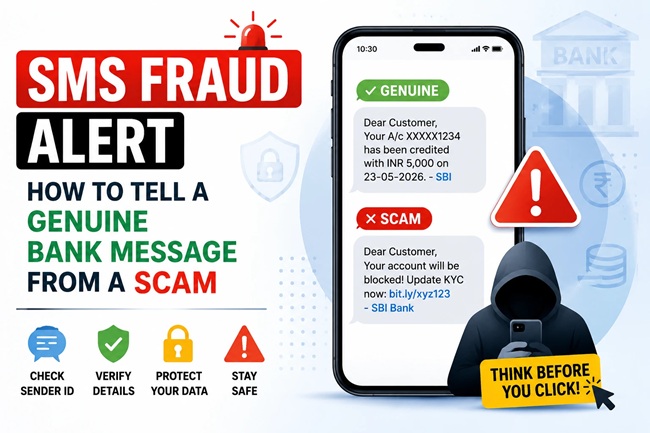
SMS Fraud Alert: How to Tell a Genuine Bank Message From a Scam

Deepak got a text one afternoon that looked exactly like every other alert his bank had ever sent him. Same sender name, same format, sitting right in the same conversation thread as his salary credit message from two days earlier. It said his KYC had expired and his account would be blocked within 24 hours unless he updated it through the link provided. He clicked it, entered his details on what looked like his bank’s website, and by evening, ₹43,000 was gone from his account.
What unsettled Deepak most wasn’t that he’d fallen for it, it was that the fake message had appeared in the exact same thread as his real bank alerts, with the exact same sender name. He’d always believed that if a message showed up alongside his genuine bank texts, it had to be genuine too. That belief is precisely what scammers are counting on, and it’s wrong.
Quick answer: A message’s sender ID, even when it matches your bank’s name exactly and appears in the same conversation thread as genuine alerts, proves nothing about who actually sent it, since sender IDs in India can be spoofed. The real tell isn’t where the message sits on your phone, it’s what it’s asking you to do. Genuine banks never ask you to share an OTP, click a link to “verify” your account, or grant remote access to your phone. If a message pressures you to act urgently through a link or a call, treat it as fraudulent until you’ve verified it independently through your bank’s official app or the number printed on your card.
Why SMS Fraud Is Getting Worse, Not Better
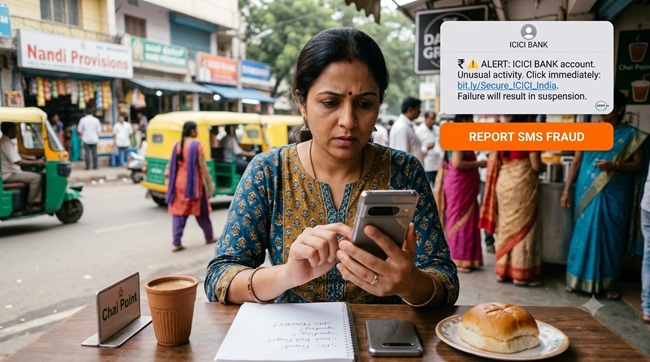
Text message scams targeting Indian bank customers have risen sharply over the past year, with fraud-detection researchers reporting well over a 100% increase in SMS-based banking scams comparing the most recent year-over-year period. Fraudsters increasingly use AI-generated messages that read more convincingly and mimic official bank language far more closely than the obviously broken, typo-ridden scam texts of a few years ago. This matters because a lot of the advice people still rely on, “look for spelling mistakes,” “check if it’s addressed to you by name,” simply doesn’t catch these newer, more polished attempts anymore.
The One Thing Almost Nobody Understands About Sender IDs
This is the single most important thing to understand about SMS fraud in India today, and it’s exactly what caught Deepak out. An SMS sender ID, the short alphanumeric name you see instead of a phone number, isn’t a verified, cryptographically signed identity. It’s simply a text label carried along with the message. Legitimate businesses register these headers, things like a bank’s official ID, through a system called DLT, the Telecom Regulatory Authority’s registration framework, but that registration governs who’s allowed to use a header, it doesn’t stop someone from illegitimately supplying that same header string through a compromised bulk-messaging route, a rogue reseller, or in some cases a fake mobile tower.
Your phone’s messaging app groups texts into a single conversation based purely on matching sender ID text, not on verifying where the message actually originated. This means a spoofed message using your bank’s exact registered header will land in the very same thread as your genuine bank alerts, sitting right below your real salary credit or last month’s real OTP message, looking completely indistinguishable at a glance. This single fact is responsible for a huge share of successful SMS fraud, because it exploits the very reasonable, but mistaken, assumption that “it’s in the same thread as my real messages, so it must be real.”
Once you internalize that thread placement proves nothing, a lot of the psychological pressure these scams rely on simply falls away.
You May Also Like To Read About:
SMS Fraud : The Red Flags That Actually Matter
Since sender ID and thread placement can’t be trusted on their own, here’s what genuinely distinguishes a scam message from a real one.
It asks you to do something urgent, through the message itself. Phrases like “your account will be blocked in 24 hours,” “immediate KYC update required,” or “suspicious transaction detected, verify now” are designed to trigger panic and rushed decisions. Genuine banks do send time-sensitive alerts, but they don’t pressure you to act exclusively through a link embedded in the SMS itself.
It contains a link, and asks you to click it to fix something. Legitimate transactional alerts, like an OTP or a debit confirmation, are purely informational. They don’t typically ask you to click a link to “resolve,” “verify,” or “unblock” anything. Any bank SMS pushing you toward a link to take urgent action deserves suspicion by default.
It asks for an OTP, PIN, or password directly. No genuine bank, ever, asks you to share an OTP, your card PIN, CVV, or net banking password over SMS, phone call, or any messaging app. This is true without exception, and it remains the single most reliable red flag across virtually every banking scam variant.
It asks you to install a remote access app. Some scams, particularly around fake KYC updates or fake refund processing, walk victims through installing a screen-sharing or remote access app under the guise of “helping” resolve an issue. Once installed, this gives the scammer direct access to everything on your phone, including banking apps already logged in. No legitimate bank support process requires this.
The link’s actual domain doesn’t match your bank’s real website. Scam links are often shortened URLs or use domains that look close to, but subtly different from, your bank’s genuine domain, an extra word, a different extension, a misspelling. Hovering over or long-pressing a link before tapping it, where your phone allows, can reveal the actual destination URL, which is worth checking before you click.
It claims a payment or refund has already landed in your account. A particularly common variant used against small sellers and freelancers involves a fake “payment received” SMS, timed right before or after a transaction, designed to convince you money has already arrived so you release goods or services before checking your actual account or app balance. An SMS is only a notification, never treat it as proof that money has actually moved.
What a Genuine Bank Message Typically Looks Like
Genuine transactional alerts are almost always purely informational: a debit or credit confirmation with a specific amount, date, and often the last few digits of your account or card, sent after a transaction has already happened, not before, and not asking you to do anything in response. Real KYC or document update requests from banks are typically communicated well in advance, are never framed as a 24-hour ultimatum, and direct you to update details by visiting a branch or logging into the bank’s official app, not by clicking a link inside the SMS itself.
How to Actually Verify a Suspicious Message
The single most reliable way to check whether a message is genuine is to stop engaging with the message entirely and verify independently instead. Open your bank’s official app directly, not through any link in the SMS, and check whether the alert or issue mentioned actually shows up there. Alternatively, call your bank using the number printed on the back of your debit or credit card, or on your passbook, never a number mentioned within the suspicious message itself, since scam messages sometimes include a fake “helpline” number that connects you straight back to the scammer.
For messages claiming to be from the Reserve Bank of India, the Income Tax Department, or law enforcement bodies like the Indian Cyber Crime Coordination Centre, the same principle applies: verify directly through their official websites rather than trusting any link or number provided in the message.
What to Do If You’ve Already Clicked or Responded
If you’ve clicked a suspicious link but haven’t entered any information, close the browser tab immediately and avoid entering anything if a page loads. If you’ve already entered banking credentials, an OTP, or your PIN on a page you now suspect was fake, contact your bank’s official fraud helpline immediately to block your card or freeze net banking access, since acting within the first few minutes meaningfully improves the odds of stopping the fraudulent transaction before it clears. If you granted remote access to your phone through an app, disconnect from the internet and uninstall the app immediately, then contact your bank before doing anything else on that device.
Once you’ve secured your account, report the incident on the National Cyber Crime Reporting Portal, and separately report the fraudulent SMS to your bank so they can flag it internally and potentially alert other customers.
Common Mistakes People Make With SMS Fraud
The most frequent mistake, as Deepak’s experience shows, is trusting a message purely because it appeared in the same thread as genuine bank alerts, without realizing sender ID matching is a display convenience, not a security guarantee.
Another common mistake is calling a number provided within the suspicious message itself to “verify” it, which often connects directly to the scammer running a script designed to sound exactly like genuine customer support, complete with asking for the very OTP or details they’re trying to steal.
A third mistake is assuming SMS frauds only target less tech-savvy or older users. The rise of AI-generated, well-formatted scam messages means grammatical errors and awkward phrasing, long considered the easiest tell, are becoming far less reliable indicators than they used to be, which means everyone, regardless of digital familiarity, needs to rely on the behavioural red flags covered above rather than surface-level polish.
My Take
The advice to “look for spelling mistakes and generic greetings” made sense a few years ago, but it’s genuinely outdated now, and relying on it gives people a false sense of security against scams that have gotten considerably more sophisticated. The one mental shift that actually protects you is remembering that a message’s sender name and its position in your phone’s conversation thread tell you nothing reliable about who sent it. What matters is always what the message is asking you to do. If it’s asking you to click, call a number it provided, share an OTP, or install anything, that’s the signal to stop, not the tone or the spelling.
Frequently Asked Questions
How can I tell if a bank SMS is fake? Focus on what the message is asking you to do rather than how it looks. Genuine bank messages don’t ask for OTPs, PINs, or passwords, don’t pressure you to click a link urgently, and don’t ask you to install remote access apps. If a message does any of these, treat it as fraudulent regardless of how authentic the sender name looks.
Can scammers really fake a bank’s sender ID? Yes. Sender IDs in Indian SMS systems are text labels, not verified or cryptographically signed identities. Through compromised bulk-messaging routes or rogue resellers, scammers can display the same registered header your bank genuinely uses, which is why a fake message can appear in the same conversation thread as real bank alerts.
If a scam SMS appears in the same thread as my real bank messages, does that mean it’s genuine? No. Phones group messages into threads based purely on matching sender ID text, not on verifying the actual origin of the message. A spoofed message using your bank’s exact header will land in the same thread as genuine alerts, so thread placement alone proves nothing about authenticity.
Do banks ever ask for OTP or PIN over SMS or call? No, never. Legitimate banks do not ask customers to share an OTP, PIN, CVV, or net banking password through SMS, phone call, or any messaging platform. Any message or call requesting this should be treated as fraudulent without exception.
What should I do if I clicked a link in a suspicious SMS? If you haven’t entered any information, close the page immediately. If you’ve already entered banking credentials or an OTP, contact your bank’s official fraud helpline right away to block your card or freeze access, since acting quickly improves the chances of stopping the transaction.
How do I verify if a bank SMS is genuine? Don’t use any link or number provided in the message itself. Instead, open your bank’s official app directly or call the number printed on your debit card or passbook to confirm whether the alert is genuine.
Where can I report an SMS scam in India? You can report SMS fraud on the National Cyber Crime Reporting Portal, and separately notify your bank through their official fraud reporting channel so they can flag the number or sender pattern internally.
Why do fake bank messages sometimes have no spelling mistakes anymore? Fraudsters increasingly use AI-generated text to draft scam messages, which has made grammatical errors and awkward phrasing far less reliable as a warning sign compared to a few years ago. It’s safer to rely on behavioural red flags, like urgent action requests or embedded links, rather than surface-level writing quality.
What is smishing? Smishing is a term for phishing scams carried out specifically through SMS text messages, where fraudsters impersonate trusted entities like banks to trick victims into sharing credentials, clicking malicious links, or installing harmful apps.
Can a fake payment confirmation SMS trick me into releasing goods before payment actually arrives? Yes. This is a common tactic against sellers and freelancers, where a fake “payment received” SMS is sent to create false confidence that money has landed. Always confirm the actual amount inside your bank or payment app directly before releasing any goods or services, never based on an SMS notification alone.
Disclaimer: This article is for general informational and educational purposes only and does not constitute legal or cybersecurity advice. Scam tactics evolve continuously, and no set of warning signs can guarantee complete protection. If you believe you’ve been a victim of SMS fraud, contact your bank immediately and report the incident through the National Cyber Crime Reporting Portal.

Shuchi founded Finance Checks after spending 16+ years working in corporate, managing operations and distribution. She managed her own finances, learned and read regularly and helped people make sense of their savings, loans, insurance, and investments.
She started this site to offer the kind of clear, honest financial guidance she wished was more available when she was learning to manage her own money. Every article is researched personally, checked against official sources such as the Reserve Bank of India, SEBI, or the Income Tax Department, and revisited whenever regulations or figures change. She is upfront about how the site earns money through ads and select affiliate partnerships, and she does not let either influence what she actually recommends to readers.



[…] SMS Fraud Alert: How to Tell a Genuine Bank Message From a Scam […]