
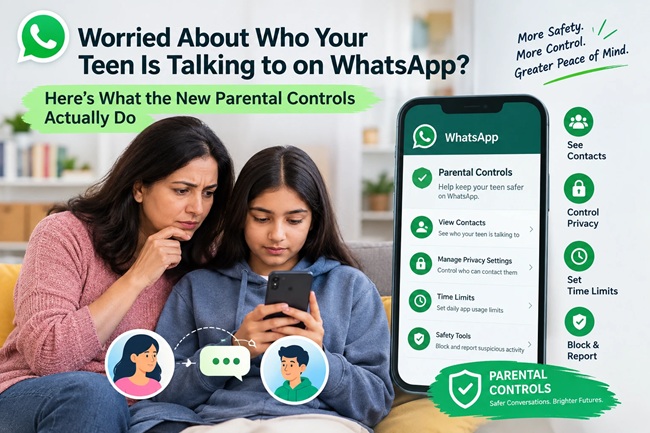
Worried About Who Your Teen Is Talking to on WhatsApp? Here’s What the New Parental Controls Actually Do

By the FinanceChecks.com Editorial Team | Published October 2, 2026 | Last reviewed October 2, 2026 | 8-minute read
If you’ve ever watched your teenager’s phone light up with WhatsApp notifications and wondered who exactly is on the other end, you’re not alone, and WhatsApp has just given parents a genuine, if limited, way to find out more. On September 30, 2026, the Meta-owned messaging platform rolled out optional parental controls specifically built for teen accounts, covering privacy settings, group activity, Channels, Status and access to Meta AI. The rollout lands at a moment when Meta’s platforms are under sustained scrutiny globally over the real-world harm they can cause young users, so it’s worth understanding exactly what these controls do, and just as importantly, what they don’t.
What’s Actually New Here
WhatsApp is introducing optional parental controls for teen accounts, designed to be set up jointly by a parent and their teenager rather than switched on unilaterally and silently. This follows an earlier feature called Parent Managed Accounts, aimed at pre-teens, which gave parents tighter oversight of who pre-teens could contact and which groups they could join. The new teen controls take a different, lighter-touch approach, parents and teens can both view the teen’s privacy settings, but if the teen wants to make those settings less restrictive, they need parental approval through a PIN the parent sets.
The one thing WhatsApp has been consistent about across every detail of this rollout is what the controls deliberately don’t do: they don’t give parents access to the actual content of their teen’s private messages or calls. End-to-end encryption on personal chats remains intact. This is oversight of settings and activity patterns, not surveillance of conversations.
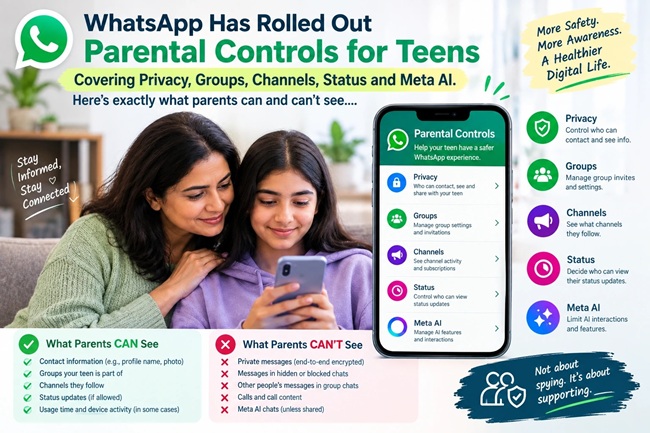
What Parents Can Actually Control
Privacy settings. Parents can set who is able to see their teen’s profile photo and who can add the teen to groups. If the teen wants to loosen these settings later, say, opening their profile photo visibility to a wider audience, that change requires the parent’s approval via PIN.
Group activity alerts. Rather than monitoring message content, WhatsApp gives parents visibility into group-level activity: parents can choose to be notified when their teen joins or leaves a group, or when a group the teen belongs to grows significantly in size. This is a meaningful middle ground, it flags activity patterns worth a conversation without putting parents inside the actual chat.
Channels. Parents can decide how their teen uses WhatsApp Channels, with reported options ranging from allowing the teen to view all Channels, to restricting them to only parent-approved Channels, to blocking Channels access entirely.
Status. Parents can manage two separate things here: whose Status updates their teen is able to see, and who is able to see the teen’s own Status updates.
Meta AI access. This is one of the more specific and genuinely useful controls in the rollout. Parents can choose between WhatsApp’s default setting for users aged 13 and up, or a stricter “Limited Content” option that further restricts the topics a teen can discuss with Meta AI. Notably, when the Limited setting is enabled, Meta AI features that rely on what’s called Private Processing, such as incognito-style chats or message summaries, become unavailable entirely, not just restricted.
What Parents Cannot Do
It’s worth being direct about the limits, since the framing of “parental controls” can sometimes create an impression of more oversight than actually exists. Parents cannot read the content of their teen’s one-on-one or group messages. They cannot listen to or review call content. The controls operate entirely at the level of settings, permissions and activity notifications, not message surveillance. WhatsApp has been explicit that this separation is intentional, positioning the feature as a way to support family conversations about safe platform use, rather than a monitoring tool that bypasses a teen’s expectation of private communication with friends.
You May Also Like To Read About:
How the Controls at a Glance
| Area | What Parents Can Control | What Remains Private |
|---|---|---|
| Privacy settings | Who sees profile photo; who can add teen to groups | N/A |
| Group activity | Alerts when teen joins/leaves a group, or a group grows significantly | Actual message content within groups |
| Channels | Full access, parent-approved only, or no access | Content the teen views within allowed Channels |
| Status | Whose Status teen can see; who can see teen’s Status | N/A |
| Meta AI | Default 13+ experience or stricter Limited Content mode | One-on-one chats and calls remain end-to-end encrypted |
| Settings changes | Teen needs parental PIN approval to loosen a restrictive setting | Teen can still view and adjust settings within allowed limits |
Why This Is Happening Now
This rollout doesn’t exist in isolation. It arrives as Meta’s platforms, WhatsApp, Instagram and Facebook among them, face intense and sustained scrutiny from regulators, child safety advocates and parents globally over how effectively they protect young users. Instagram has separately introduced tighter messaging restrictions this year preventing unsolicited adults from messaging teens who don’t follow them, alongside expanded parental controls allowing guardians to actually approve or deny a teen’s privacy setting changes, rather than just being notified after the fact, which was the earlier, weaker version of that feature. Meta has also rolled out tools restricting teens from encountering self-harm and eating disorder content on Facebook and Instagram, and automated parental alert systems tied to concerning search activity.
Seen together, this is a company making a visible, coordinated push across its entire family of apps to add more parental visibility, under real pressure to demonstrate it’s taking youth safety seriously, following years of criticism and, in some jurisdictions, regulatory investigation into the platforms’ effect on young users’ wellbeing.
What Parents Should Actually Do With This
Setting up these controls is only genuinely useful if it happens the way WhatsApp has designed it, as a joint conversation with your teen, not something switched on silently in the background. The feature itself nudges toward this, since many of the settings are visible to both parent and teen, and changes are meant to be a shared process gated by a PIN rather than a one-way parental override. If you’re a parent considering turning this on, treating it as an opening for a conversation about who your teen talks to, what groups they’re part of, and what they’re seeing on Channels and Status tends to be more effective than treating it purely as a technical fix, since a teen who feels unilaterally monitored is also more likely to look for ways around it.
It’s also worth setting realistic expectations. These controls address visibility into settings, group patterns and content categories, they do not address who your teen might be messaging one-on-one, what’s actually said in those conversations, or group chat content itself. If your underlying concern is about stranger contact or a specific worrying conversation, these settings are a genuinely useful layer, not a complete solution on their own.
Common Mistakes Parents Make With Tools Like This
A frequent mistake is assuming “parental controls” means full message monitoring, and either being disappointed when it doesn’t deliver that, or assuming a teen’s communications are now fully visible when they aren’t. Another is enabling the controls without any conversation with the teen first, which tends to create friction and a sense of surveillance rather than the collaborative safety approach the feature is actually built around. Parents also sometimes set the controls once and never revisit them, when a teen’s platform use, friend groups and risk factors change meaningfully over just a year or two, making a periodic check-in worth building into the routine rather than a one-time setup. Finally, some parents rely entirely on a single platform’s tools, overlooking that a teen active across WhatsApp, Instagram, and other apps needs a broader conversation about digital safety that no single feature on one app can fully cover.
My Take
What’s genuinely encouraging about this specific rollout is the restraint built into it. WhatsApp could have positioned “parental controls” as full message access and marketed it as the strong, reassuring option, but it didn’t, it drew a clear line at content privacy and built the feature around settings, patterns and categories instead. That’s a defensible position given how central end-to-end encryption is to WhatsApp’s entire value proposition, but it does mean parents need to go in with accurate expectations rather than assuming this solves the broader anxiety of “who is my teen actually talking to.”
The real value here isn’t the technical feature itself, it’s the structured opening it creates for a conversation most families should probably already be having. A teen and parent sitting down together to set a Meta AI content level, agree on Channels access, and talk through why certain group alerts matter is, in a lot of ways, more protective than any individual setting on the list.
Frequently Asked Questions
1. Can parents read their teen’s WhatsApp messages with the new controls? No. Personal messages and calls remain protected by end-to-end encryption, and these controls do not give parents access to message content.
2. What exactly can parents control with WhatsApp’s new parental controls for teens? Privacy settings like profile photo visibility and group invitations, alerts about group activity, access to Channels, who can see the teen’s Status and whose Status they can view, and the teen’s Meta AI content level.
3. Are these controls mandatory for teen accounts? No, WhatsApp has described the controls as optional, and they’re designed to be set up jointly by a parent and teen rather than imposed unilaterally.
4. How does the parental PIN work? Once a parent sets a PIN, certain changes that would make settings less restrictive, such as opening up profile visibility, require that PIN for approval before a teen can make the change.
5. What’s the difference between this and WhatsApp’s Parent Managed Accounts feature? Parent Managed Accounts is aimed at pre-teens and gives parents tighter oversight of contacts and groups. The newer teen controls are a lighter-touch, optional system built around shared visibility of settings rather than parent-controlled accounts.
6. What does the Meta AI “Limited Content” setting actually restrict? It further limits the topics a teen can discuss with Meta AI compared to the default 13+ experience, and it disables Meta AI features that rely on Private Processing, such as certain summarisation or incognito-style chat features.
7. Will I be notified if my teen joins a new group? Yes, parents can choose to receive alerts when their teen joins or leaves a group, or when a group they’re part of grows significantly in size.
8. Why is WhatsApp introducing this now? It follows sustained regulatory and public scrutiny of Meta’s platforms over their effect on young users, and fits into a broader pattern of similar safety features Meta has recently rolled out across Instagram and Facebook.
Disclaimer
This article is for general informational purposes only and does not constitute legal, parenting or cybersecurity advice. Feature details reflect information available at the time of writing and may change as WhatsApp’s rollout continues to expand; parents should check the in-app Help Center for the most current description of available settings. FinanceChecks.com is not affiliated with WhatsApp or Meta Platforms, Inc.
Last reviewed and fact-checked on October 2, 2026 by the FinanceChecks.com Editorial Team.

Shuchi founded Finance Checks after spending 16+ years working in corporate, managing operations and distribution. She managed her own finances, learned and read regularly and helped people make sense of their savings, loans, insurance, and investments.
She started this site to offer the kind of clear, honest financial guidance she wished was more available when she was learning to manage her own money. Every article is researched personally, checked against official sources such as the Reserve Bank of India, SEBI, or the Income Tax Department, and revisited whenever regulations or figures change. She is upfront about how the site earns money through ads and select affiliate partnerships, and she does not let either influence what she actually recommends to readers.